

Send documents for signature—fast, secure, and trackable
Upload documents, request signatures, and track progress in real time with a secure platform built for modern workflows.
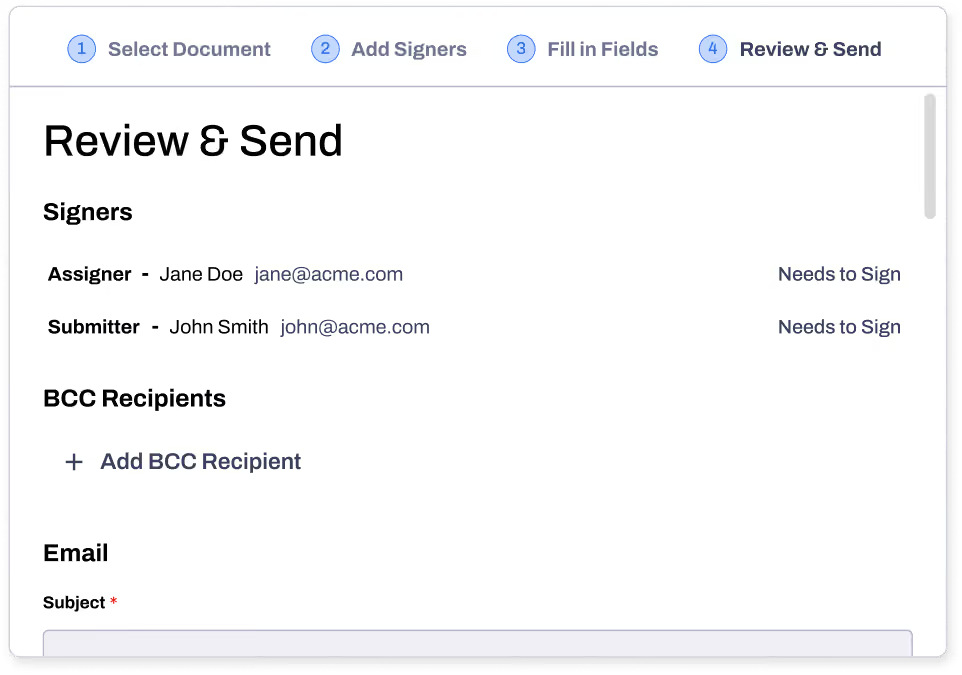





Send documents for signature, in minutes
Whether you’re collecting approvals, finalizing agreements, or onboarding clients, Inkit makes it simple:

Upload any document (PDF, Word, etc)

Add recipients and signatures fields

Send signature requests in seconds

Track who has signed and who hasn’t
Get started in three simple steps

01
Upload your document
Upload any PDF or Word file. No folder navigation, no reformatting. Your document is ready to send in seconds.
02
Add and assign recipients
Add recipients, assign signature fields, and set signing order. Build automations and store files in one platform.
03
Send and track in real time
Send instantly and follow every step from delivery to final signature. Your files stay private and secured throughout.
Why teams choose Inkit
Automate document signature requests and workflows
Turn a manual process into a seamless workflow, without any extra effort on your end.

Assign multiple signers in order or in parallel
Set automatic reminders and notifications
Track document status in real time
Complete every step without manual effort
Sign and send documents faster in one place
Upload, sign, and send PDFs and contracts in one place. No manual steps. No switching between tools.
Sign PDFs, Word documents, and contracts online
Send documents for signature in seconds
Track document status in real time
Remove manual steps from your workflow
Secure and compliant digital signature workflows
Stay in control of every document you send. No more guessing or chasing signatures.
Real-time status tracking on every document
Instant notifications when documents status updates
Legally binding and enforceable under ESIGN
Logged with a full audit trail for compliance
Secure, legally binding digital signatures you can trust
Legally binding eSignatures with full audit trails
End-to-end encryption on every document
SOC 2 and HIPAA compliant
Secure storage with role-based access controls
Built for real document workflows
From one document to thousands, manage every signature request in one place.
Send for digital signature
Send contracts for signature online, track progress in real time, and keep agreements moving without delays.
Learn More

Request NDA approvals
Send NDAs for signature with full visibility. Know exactly when documents are opened, signed, and completed.
Learn More
Collect internal agreements
Streamline internal workflows by sending documents for approval in one place and keep every step organized.
Learn More
FAQs
Got a different question? Email us at support@inkit.com.
How do I send a document for signature online?
Upload your document, add recipients, and place signature fields where needed. Send it instantly and track progress in real time from open to completion. No manual follow ups or delays.

Can I send documents for electronic signature to multiple people?
Yes, you can send documents to multiple people and control the signing order. Assign signers sequentially or allow parallel signing depending on your workflow. You always know who has signed and who has not.
What types of documents can I send for signature?
You can send contracts, NDAs, agreements, and internal documents for signature. Upload PDF or Word files and prepare them in seconds. Everything is managed in one secure place.
Can I track document status after sending for signature?
Yes, you get full visibility into every document you send. Track when documents are opened, viewed, and signed in real time. This eliminates guesswork and gives you complete control.
Are documents sent for signature legally binding?
Documents signed through Inkit are legally binding and enforceable under ESIGN standards. Every signature includes a full audit trail and certificate of completion. This ensures compliance and accountability.
Is it secure to send documents for signature online?
All documents are protected with end to end encryption and secure access controls. You maintain control over who can access and sign your documents. Inkit is built to protect your data and provide peace of mind.


Trusted by Those Who Put Security First


